Free Fire players love standing out with eye-catching profiles. While the main player nickname (ID) cannot be directly colored due to game restrictions, you can achieve a "colored" look using stylish Unicode fonts that appear premium and vibrant.
This guide covers both methods with step-by-step instructions, examples, and tools - all working as of January 2026.
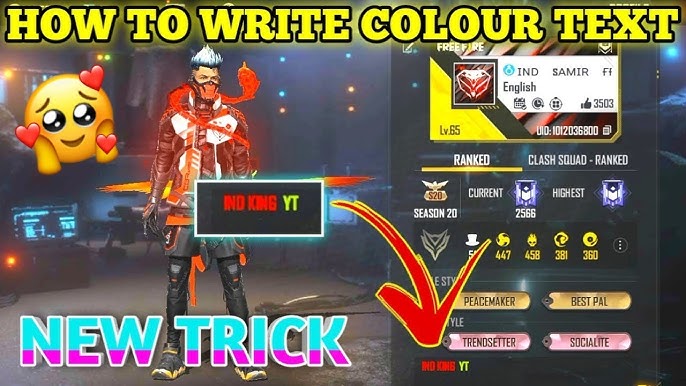
Part 1: Create Stylish "Colored" Nicknames Using Unicode Fonts
Your in-game nickname supports fancy Unicode characters from generators. These create glowing, bold, or gradient-like effects that mimic colors. No diamonds needed beyond the name change card.
Steps to Change Your Nickname:
- Get a Name Change Card: Earn it free from events or buy for 390 diamonds in the in-game shop (under "Diamonds" tab).
- Generate Stylish Name: Visit a free tool like:
Type your name (e.g., "ProGamer"), select a style, and copy.
- Apply in Game:
- Open Free Fire > Tap your profile icon (top-left).
- Tap the pencil icon next to your current name.
- Paste the stylish text (max 12 characters).
- Use the Name Change Card and confirm.
- Preview: Your new name will show fancy fonts in lobbies.
20+ Stylish Name Examples (Copy-Paste Ready):
| Style | Example |
|---|---|
| Bold King | ꧁•𝕂𝕀ℕ𝔾•꧂ |
| Neon Glow | ᴳᴼᴰ✪Pro✪ᴿᴬᴳᴱ |
| Wolf Theme | 亗•LONE WOLF•亗 |
| Rainbow Effect | ★彡[Pro]彡★ |
| Fire Style | PʀᴏFɪʀᴇ |
| Queen Vibes | ♕Qᴜᴇᴇɴ♕ |
| Shadow | ☬Sʜᴀᴅᴏᴡ☬ |
| Gold | ༺Gᴏʟᴅ༻ |
| Hacker Look | 乂Hᴀᴄᴋᴇʀ乂 |
| Pro Sniper | ᴾᴿᴼSɴɪᴘᴇʀ |
These look vibrant in-game!
Part 2: Add Real Colors to Bio, Signature, and About Me
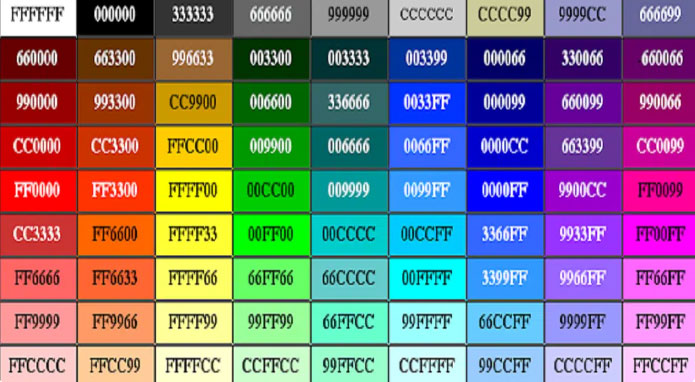
This is where true colors shine! Use HEX codes in formats like [b][c][HEX]Text (bold + color) or [HEX]Text. Works 100% in profile sections viewed by others.
Steps to Apply Colors:
- Launch Free Fire > Go to Profile (top-left avatar).
- Tap pencil icon next to Bio, Signature, or About.
- Paste code like
[b][c][ff0000]Your Text(red example). - Save. Colors show for other players (raw code visible to you).
- Tip: Mix colors, e.g.,
[b][c][ffff00]Rush[b][c][ff0000]King.
Warnings: No extra spaces. Colors may vary slightly in-game. Avoid overuse to prevent glitches.
Essential Color Codes Table
| Color | HEX Code | Example Code |
|---|---|---|
| Red | ff0000 | [b][c][ff0000]Headshot |
| Yellow | ffff00 | [b][c][ffff00]Booyah |
| Green | 00ff00 | [b][c][00ff00]Pro |
| Blue | 0000ff | [b][c][0000ff]Rush |
| White | ffffff | [b][c][ffffff]Legend |
| Pink | ff69b4 | [b][c][ff69b4]Queen |
| Orange | ffa500 | [b][c][ffa500]Fire |
| Purple | 800080 | [b][c][800080]Shadow |
| Gold | ffd700 | [b][c][ffd700]King |
| Black | 000000 | [b][c][000000]Ghost |
| Cyan | 00ffff | [b][c][00ffff]Noob |
| Gray | a0a0a0 | [b][c][a0a0a0]Lobby |
Generate Custom HEX: Go to color-hex.com, pick color, copy 6-digit code, add to [b][c][].
Ready-to-Copy Examples:
- Signature:
[b][c][ffd319]●⃝Lᵒᵛᵉᴳᵒᵈ●⁴²⁰ - Bio:
[b][c][ff0000]▄︻̷̿┻̿═━一 ʜᴇᴀᴅsʜᴏᴛ - About:
[b][c][00c6ff]꧁༺Ꭶ₦ ЇꝔ€ℜ༻꧂ - Rainbow:
[b][c][ff0000]Red[b][c][ffff00]Yellow[b][c][00ff00]Green - Love:
[b][c][ff004c] L O V E
Best Tools & Generators (2026 Updated)
- Bio Color Generator: BlankTextCopy FF Color - Live preview, multi-color.
- Bio Styles: 95+ FF Bio Codes
- Full Profile Guide: HLGaming Bio Colors
Pro Tips
- Combine: Stylish name + colored bio = ultimate profile.
- Test in lobby: Colors visible to friends/enemies.
- Updates: Garena may tweak, but these work post-OB46.
- No Ban Risk: Official feature.
Follow this, and your Free Fire profile will dominate lobbies. Booyah!







Comments