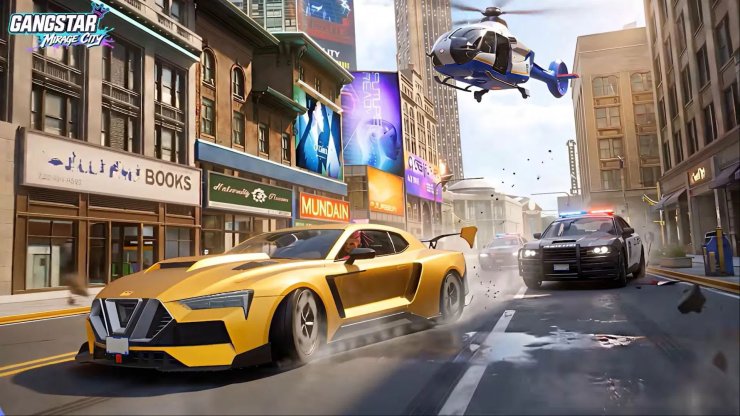
Gangstar Mirage City is the latest entry in Gameloft’s long-running open-world action series. Published by Level Infinite, this free-to-play multiplayer urban open-world game launched in soft launch on August 20, 2026. It is set in the near-future city of Rooklyn (also called Mirage City), where players build criminal empires, customize vehicles and weapons, pull off co-op heists, race, fight for territory, and take part in dynamic events.
The game drew more than 30 million pre-registrations before release. It mixes structured story missions with emergent street-level chaos, empire-building systems, Director’s Mode for creating custom videos, and multiplayer modes such as Co-op Heists, Taxi Takeover, Fight of the Bites, Treasure Rush, and battle-royale-style Orarra Fight.
Is Gangstar Mirage City Available on PC?
No. There is currently no native PC version of Gangstar Mirage City. Official releases list only iOS and Android. The game is available through the App Store and Google Play in its soft-launch regions: Southeast Asia, South Asia, Eastern and Central Europe, MENA, and LATAM. A full global rollout has not been announced yet.
Players outside those regions may not see the game in their local stores. Some work around this with region-changing methods or by waiting for wider availability, but those approaches carry their own risks and are not officially supported.
How to Play Gangstar Mirage City on Mobile
- Confirm you are in a supported soft-launch region.
- Open the Google Play Store (Android) or App Store (iOS).
- Search for “Gangstar Mirage City.”
- Download and install the free app (it includes in-app purchases).
- Create or log into a Level Infinite account if prompted, then start playing.
The game is rated Mature 17+ / 18+ and supports multiple languages including English, Indonesian, Thai, Arabic, Spanish, Portuguese, Turkish, Russian, Tagalog, and others, with English voiceover.
How to Play Gangstar Mirage City on PC
Although there is no official PC client, you can run the Android version on a Windows or Mac computer using a reliable Android emulator. Popular options include BlueStacks, MuMu Player, and MEmu. These tools let you play on a larger screen with keyboard and mouse controls, higher frame rates, and longer sessions without battery drain.
General steps (using any major emulator):
- Download and install a trusted Android emulator from its official website (BlueStacks, MuMu Player, or MEmu).
- Launch the emulator and sign in with a Google account so you can access the Google Play Store.
- Search for “Gangstar Mirage City” inside the Play Store within the emulator.
- Install the game the same way you would on a phone.
- Once installed, open it from the emulator’s home screen. Map controls for movement, shooting, driving, and menus so the experience feels closer to a native PC game.
- If the game does not appear due to region locks, some players change the emulator’s Google account region or install an APK directly, but this is unofficial and may violate terms of service.
Typical minimum system requirements for emulators (these vary slightly by software):
- Windows 7 or later (or macOS 11+ for Mac versions)
- Dual-core or quad-core Intel/AMD processor (or Apple Silicon)
- 4 GB RAM (8 GB or more recommended for smoother performance)
- Several GB of free storage
- Up-to-date graphics drivers; virtualization (VT-x/AMD-V) enabled in BIOS
Higher-end hardware allows better graphics settings and frame rates up to 60–120 FPS or more depending on the emulator.
Tips for a Better Experience
- Use a wired internet connection for multiplayer stability.
- Allocate more RAM and CPU cores to the emulator in its settings for open-world performance.
- Customize key bindings early; driving and combat feel much better with keyboard and mouse than touch controls.
- Keep the emulator updated, as developers often optimize for popular mobile titles.
- Pre-registration rewards (diamonds, vehicle packs, upgrade vouchers) were distributed to eligible players after the August 20 launch. New players can still progress freely.
Gangstar Mirage City brings the classic Gangstar formula into a persistent multiplayer near-future setting. While it remains mobile-first for now, Android emulators make it fully playable on PC with a more comfortable setup. Check the official website or your regional app stores for the latest availability updates as the soft launch continues.





Comments