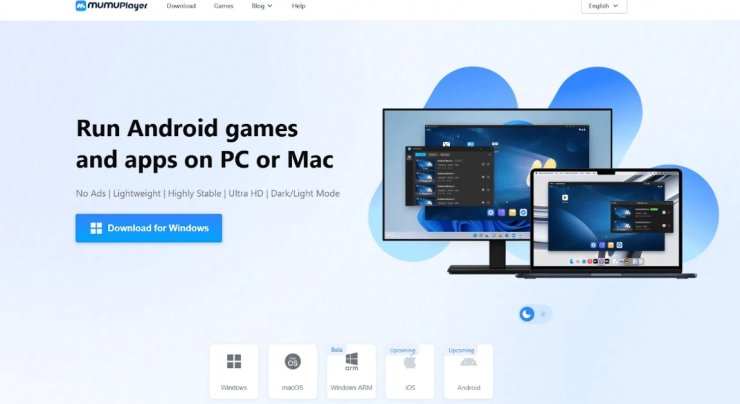
Gamers find mobile games more engaging on bigger screens.MuMuPlayer makes this easy and fun.This emulator transforms your PC into a high-performance gaming system for Android apps. With millions of users drawn to its speed and innovative features, it’s worth discovering what makes it special.
MuMuPlayer Speed That Starts Your Adventure Fast!
MuMuPlayer launches in just three seconds. You jump into games without waiting. It uses 52% less memory than other emulators. This keeps your PC running smoothly. Gamers hate lag, so MuMuPlayer boosts stability by 65%. No crashes ruin your sessions.
You open the app and dive into PUBG Mobile right away. The quick start saves time. Players stay focused on winning, not loading screens. MuMuPlayer never stops your adventure. Rather, it maintains the speed that keeps your momentum fast.
What Makes MuMuPlayer So Fast?
Following features makes MuMuPlayer a competitive emulator:
-
Play on Any Device You Own
MuMuPlayer works on Windows, macOS, and even Windows ARM devices. You get a pure Android feel on your computer. Install apps manually with APK, APKS, or XAPK files. This flexibility lets you try any game.You can play on any devices.MuMuPlayer handles it all. It supports mainstream apps too. No worries about compatibility issues because MuMuPlayer is here to resolve them.
- Windows users enjoy DirectX and OpenGL support.
- Mac fans love the gesture controls, like two-finger swipes.
- ARM devices run games without hiccups.
This broad support draws in diverse gamers. You play wherever you want.
-
Controls That Feel Like Magic
MuMuPlayer turns your keyboard and mouse into perfect tools. Toggle controls with F12 for quick changes. Customize schemes to fit your style. Gamepads work great too.On macOS, use gestures like double-taps for multitasking. Swipe to navigate apps easily. These features make mobile games feel native on PC.
Gamers prefer precision while playing their favourite game. MuMuPlayer delivers it. Aim better in shooters or move faster in action games. You create custom mappings for any title.
-
Visuals That Pop on Your Screen
MuMuPlayer maximizes your GPU for stunning graphics. Intelligent frame tech keeps things smooth.Games like Genshin Impact look amazing. Colors shine brighter on big monitors. No frame drops bother you.That's why players choose this for immersive experiences. High visuals pull you deeper into worlds. Adjust FPS in settings to match your hardware. It gives better visuals on the PC screen.
-
Run Multiple Games at Once
MuMuPlayer offers unlimited multi-instances. Play several accounts together. Use less resources than rivals. This suits grinders in games like CookieRun: Kingdom.Farm resources in one window while battling in another. Efficiency skyrockets. Gamers multitask without slowing down their PC.
- Open as many instances as your system allows.
- Sync actions across windows for faster progress.
- Lower memory use keeps everything stable.
Power users love this feature. It changes how you play mobile games on PC.
-
No Ads to Break Your Flow
MuMuPlayer stays ad-free. Focus on gaming without interruptions.This is what a gamer demands in an emulator. The clean interface switches between dark and light modes. Your eyes thank you during long sessions.While other emulators bombard you with pop-ups. MuMuPlayer keeps it simple. Gamers appreciate the pure experience.
-
Community That Helps You Win
Join over 10 million users. Read blogs for tips, guides, and redeem codes. Tutorials teach advanced tricks.
Influencers on YouTube praise it. Learn from pros. The community shares strategies for games like Blue Archive.
Gamers connect and improve. MuMuPlayer builds this support network.
-
Easy Setup for Everyone
MuMuPlayer has an easy setup for everyone. System needs are low.. Install takes 2GB space on PC.Set up shared folders your way. Developer tools from version 1.5.4 add ADB connections on your PC. Modify networks if needed.Beginners start fast. Pros tweak for perfection.
How MuMuPlayer Beats the Competition?
Gamers choose MuMuPlayer to play games on PC because it beats the competition.MuMuPlayer uses fewer resources. It stays stable longer. Multi-instances run smoother.On Macs, M1 and M2 chips handle high-res games well. Gestures make controls intuitive.Gamers pick it for reliability. Over 2.2 million games work flawlessly. Titles like Fortnite and Pokemon TCG Pocket shine.
Boost Your Gaming Today on PC with MuMuPlayer!
MuMuPlayer changes mobile gaming on PC. Its speed, controls, and features win hearts. Download it and see the difference. You gain better performance and fun. Join the millions who choose smart.
There are many real stories from players. Many share success online. One user runs Genshin Impact at steady FPS on Mac. Another farm in multiple instances without lag.These tales show real benefits. Gamers trust MuMuPlayer for daily play








Comments