Convoys let you drive, race, explore, and complete activities as a group without getting separated into different sessions. This guide covers everything you need to know to get started with convoys in Forza Horizon 6.
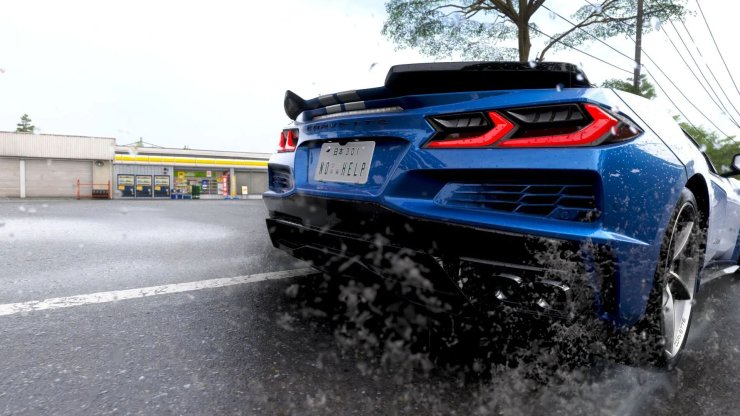
What Is a Convoy in Forza Horizon 6?
A convoy is essentially your private multiplayer party. It supports up to 12 players who stay together in the same shared world. Once you form a convoy, you can freely roam the map, tackle events together, and see each other in real time with custom liveries and license plates visible. The system works seamlessly across Xbox Series X|S, PC, and PlayStation 5 thanks to full crossplay.
Convoys make it easy to enjoy co-op campaign progress, spec racing, time attacks, and brand-new Japan-themed modes like Touge Showdown and Horizon CoLab.
How to Create a Convoy
Creating a convoy is quick and straightforward on any platform:
- Pause the game while in free roam.
- Press the Y button (Xbox), Triangle button (PlayStation), or the equivalent key on PC to open the Online menu.
- Select the Convoy option.
- Choose Create a Convoy.
- Pick your session type (Friends Only is recommended for a private group).
- Return to free roam. You are now the convoy leader.
As the leader, you control which events the group joins. Your friends will receive an invitation that loads them into your world almost instantly.
How to Invite Friends to Your Convoy
Once the convoy is active:
- Go back to the Convoy menu.
- Select Invite Friends.
- Choose players from your Microsoft/Xbox friends list (or PlayStation friends if crossplay is enabled).
Invites are fast. Most players join the shared session in under 10 seconds. You can also invite directly from the friends list in the pause menu.
If a friend is already online in Forza Horizon 6, they can join your game directly without waiting for an invite by selecting your name and choosing Join Game.
How to Join an Existing Convoy
- On PC (Steam or Microsoft Store): Open the Xbox app or Shift+Tab overlay, find your friend, right-click their name, and select Join Game.
- On console: Use the in-game friends list or accept the convoy invite notification that appears on screen.
Make sure crossplay is enabled in the settings (Pause Menu > Campaign > Settings > HUD & Gameplay > Online Crossplay) so you can play with friends on different platforms.
Key Features and Activities You Can Enjoy in a Convoy
- Shared World Exploration: Drive across Japan together without players disappearing when crossing regions.
- Co-op Campaign: Complete story missions and unlock Horizon Hubs as a team. Everyone earns progress and rewards.
- Convoy Leaderboards: In Time Attack zones, compete directly against your friends' times.
- Horizon CoLab: Up to 12 players can build custom tracks, ramps, and drift parks in real time together.
- New Japan Modes: Try Touge Showdown on mountain passes, Hide & Seek in Tokyo alleys, or drag meets on highway strips.
- LINK System Rewards: Drive close to convoy members to earn bonus XP, emotes, horn sounds, and gift drops.
- Car Meets and Estates: Hang out at designated meet spots or in purchased estates to show off cars and liveries with zero loading screens.
Pro Tips for the Best Convoy Experience
- Stay close to your friends to activate Co-op LINK bonuses.
- Use the activity feed in the convoy menu to keep track of what everyone is achieving.
- Set a session tag (like Road Racing or Cruising) when creating the convoy so random players understand your group's plans.
- For pure skill testing, start a Spec Racing Championship where everyone uses the exact same car.
- Proximity chat works great in convoys for easy communication while driving.
Common Issues and Troubleshooting
If you cannot invite or join a convoy:
- Double-check that both players have crossplay enabled.
- Make sure you are friends on the Microsoft/PlayStation network.
- Restart the game or check your internet connection.
- Verify that the friend is actually online in Forza Horizon 6 and not in a restricted session.
Forza Horizon 6 has improved server sharding, so most connection issues are rare, but the game is only a few days old at launch. Performance should continue to improve with early patches.






Comments