AI-assisted tools can help game developers move from a prompt or reference image to a draft character, prop, or environment asset. They are most effective during concept development and prototyping; production assets still need checks for topology, materials, scale, performance, and licensing.
The ten options below cover different parts of the workflow. Some focus on full 3D generation, while others are stronger at concept art, reference-based conversion, or material creation. Developers should test each tool with their own art direction and target engine rather than judging it from showcase images alone.
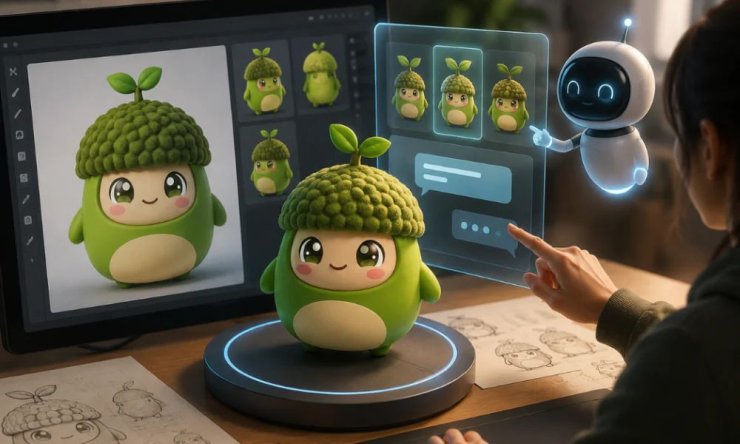
1. Meshy
Meshy supports text-to-3D and image-to-3D workflows for characters, props, and environment objects. A developer can begin with a 3D character creator workflow, export the result, and continue cleanup or rigging in a DCC application. It is useful for rapid iteration, but generated assets should still be inspected from every angle before they enter a game project.
2. Rodin by Hyper3D
Rodin focuses on generating 3D models from text or visual references. It can provide a starting point for detailed props and character concepts. Teams should evaluate polygon density, texture consistency, and how reliably results export into their preferred editing tools.
3. Sloyd
Sloyd takes a more controlled approach to asset creation, with tools suited to adjustable props and environment pieces. Procedural controls can be helpful when a team needs variations that share the same design language. It is particularly relevant for modular objects, although its strengths differ from free-form character generation.
4. Kaedim
Kaedim is designed around converting 2D references into 3D assets for production pipelines. It may suit teams that already have clear concept art and want to shorten the modeling stage. As with any conversion workflow, the output should be reviewed against the source and tested in the target engine.
5. Alpha3D
Alpha3D supports text-, image-, and multi-view-to-3D workflows, with downstream tools for retopology, UV unwrapping, texturing, rigging, and export. For game development, that broader workflow can be useful when a draft mesh needs preparation before it enters Unity, Unreal Engine, Godot, or Blender. Teams should still test results on their own art styles and performance budgets.
6. 3D AI Studio
3D AI Studio combines several AI-assisted creation options in a browser-based workflow. It can help creators test different routes from a prompt or image to a model. Developers should confirm current export formats, commercial terms, and the consistency of assets across a larger test set.
7. Masterpiece X
Masterpiece X is aimed at making 3D creation more accessible to people without extensive modeling experience. It can support concept exploration and early asset generation. For game use, the important questions are whether the resulting geometry, textures, and scale can be adapted efficiently for the project.
8. Luma AI Genie
Luma AI’s Genie workflow can turn text prompts into 3D concepts. It is useful for quickly visualizing objects and testing ideas, especially during preproduction. Developers should expect to refine selected outputs and verify that current export options fit their pipeline.
9. Scenario
Scenario is primarily useful for generating style-consistent game imagery rather than final 3D meshes. That makes it a strong upstream tool for character sheets, prop references, and environment concepts that can later guide an image-to-3D or manual modeling workflow. Teams must train and use models with appropriate rights.
10. Adobe Substance 3D Sampler
Substance 3D Sampler supports material creation from photographs and can complement generated geometry. It does not replace a 3D model generator, but it can help teams build or refine surfaces for props and environments. This makes it valuable at the texturing stage of an AI-assisted pipeline.
What to Compare Before Choosing
Run the same representative inputs through several tools and compare geometry, topology, texture quality, processing time, output formats, commercial rights, and the amount of manual work required. Characters should also be tested for rigging and deformation, while environment assets need scale, collision, and performance checks.
There is no single best tool for every studio. A concept artist may value fast visual variation, while a technical artist may prioritize predictable topology and export control. The most practical stack often combines one tool for concepts, another for draft geometry, and established DCC software for cleanup and integration.






Comments