Minecraft Java Edition 26.3, the Wilderness Bound drop, shipped on September 15, 2026. It adds the Dappled Forest, poplar wood, wool and concrete stairs and slabs, cushions, straw beds, and abandoned camps. Those extras are welcome for builders. They also mean more blocks, more entities, and more work for your GPU and CPU.
Vanilla 26.3 is playable, but farms, high render distance, and busy multiplayer worlds still hitch. The five mods below target different bottlenecks: chunk rendering, game logic, memory, HUD and entity drawing, and hidden objects you never see. Most players should start with Fabric or NeoForge, then add these one at a time and confirm the game still launches.
Always download the jar that lists 26.3 on Modrinth or CurseForge. A 26.2 file can crash on launch. These mods do not change vanilla recipes or combat. They only make the same world cheaper to run.
1. Sodium
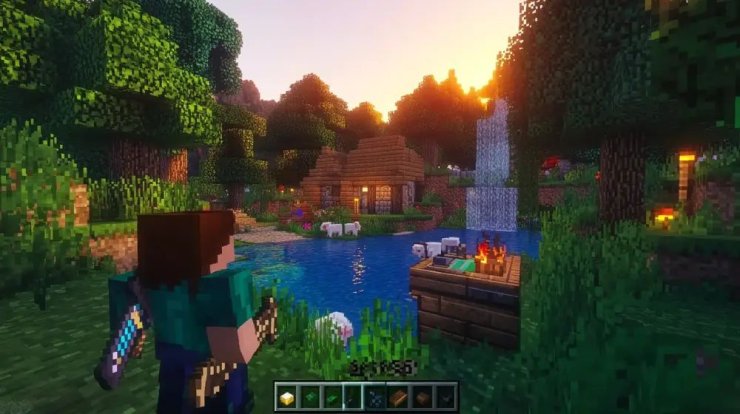
Sodium is the first mod most 26.3 players should install. It replaces Minecraft's old chunk renderer with a modern path that uses the GPU more efficiently. The usual result is a large FPS jump and fewer micro-stutters when you turn the camera or fly over terrain.
CaffeineMC released Sodium 0.9.2 for 26.3 on day one, with both Fabric and official NeoForge builds. It does not add shaders by itself. Pair it with Iris later if you want those. Do not mix Sodium with OptiFine. They fight over the same renderer.
If you only install one optimization mod, make it this one. Everything else on this list sits on top of a faster draw loop.
2. Lithium
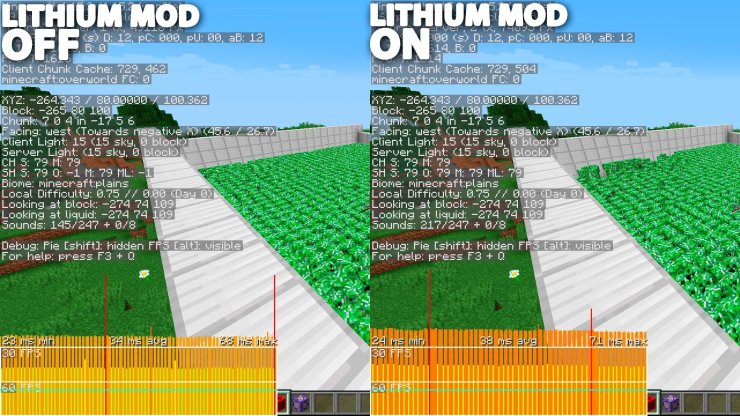
Sodium speeds up what you see. Lithium speeds up what the game thinks. It rewrites expensive game-logic paths: mob AI, collisions, block ticking, pathfinding, and hopper work. Behavior stays vanilla. Tick times drop, which helps singleplayer (your PC runs an integrated server) and dedicated servers alike.
Lithium is a CaffeineMC companion to Sodium. Clients do not need it to join a server that has it. Servers do not need clients to install it. That makes it an easy add for Realms-style worlds and small SMP hosts that want more entities before TPS starts to sag.
Install Lithium after Sodium. You will notice the difference most near mob farms, villager halls, and redstone contraptions.
3. FerriteCore
FerriteCore does not chase FPS charts. It shrinks how Minecraft stores block states, models, and similar data in RAM. Lower heap use means shorter garbage-collection pauses. Those pauses are the spikes that feel like the game froze for a tenth of a second.
The savings scale with how many mods and block variants you load. A light vanilla-plus pack might drop a few hundred megabytes. A large pack can drop much more. FerriteCore works on client and server, needs no config for the default gains, and plays well with Sodium and Lithium.
If your launcher is set to 4 GB or less, this mod is often the difference between a stable session and random stutters after twenty minutes.
4. ImmediatelyFast

ImmediatelyFast targets a different slice of the renderer: immediate-mode drawing. That covers entities, block entities, particles, maps, and on-screen text. Sodium already rebuilt chunk meshing. This mod cleans up the leftover draw calls that still hitch when a chest room, item frame wall, or nametag crowd fills the screen.
Version 1.17 added official 26.3 support for Fabric, Quilt, and NeoForge within a day or two of the drop. It is small, client-side, and meant to stack with Sodium rather than replace it. Slower CPUs usually see a bigger relative gain than high-end rigs.
Use it if inventories, maps, or busy hubs still feel heavier than the overworld itself after Sodium is in place.
5. Entity Culling
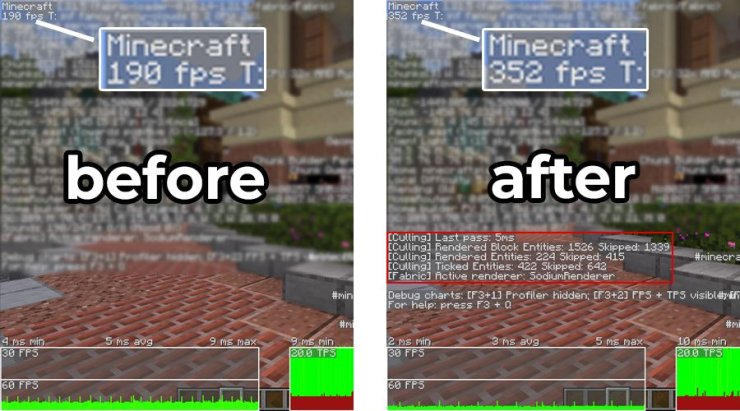
Vanilla draws every entity and block entity inside your view frustum, even if a wall sits between you and that chest or cow. Entity Culling runs a cheap visibility check on spare CPU threads and skips draw calls for things you cannot actually see.
The payoff shows up in bases, storage rooms, mob grinders, and cave systems. FPS holds up because the GPU is not painting objects behind stone. The mod is client-only. The server keeps simulating those mobs as usual.
Confirm the latest file supports 26.3 before you drop it in. Builds for 26.1 and 26.2 landed quickly after those drops, and the same author typically follows each game version within a short window. If a 26.3 jar is not up yet, More Culling is a close alternative that covers extra block and particle cases.
How to install them without breaking 26.3
Use a launcher that handles loaders cleanly: Prism, the Modrinth App, or the official launcher with a custom 26.3 installation.
- Create a fresh 26.3 profile.
- Install Fabric Loader or NeoForge for 26.3. Do not mix both in one folder.
- Add Fabric API if you chose Fabric. Many of these mods expect it.
- Drop the 26.3 jars into the mods folder. Start with Sodium only and boot once.
- Add Lithium, then FerriteCore, then ImmediatelyFast, then Entity Culling. Launch after each add so you know which file caused a crash.
- Leave OptiFine out. If you want shaders, wait for an Iris build that lists 26.3 and Sodium 0.9.2 together.
Optional extras once the core five are stable: Dynamic FPS (lowers work when the window is in the background), Krypton (network code on Fabric servers), and Spark (measures where time actually goes before you add more mods).










Comments